Cloud accounting for contracting, with branch accounting and ZATCA/ETA compliance

Run every branch, project, and margin from one system.

ENGINEX connects office, site, finance, and inventory in one flow, consolidates branch results in a head-office dashboard, and invoices in line with ZATCA in Saudi Arabia and ETA in Egypt.

No credit cardArabic and EnglishWindows, web, and mobile

Built for contracting, construction, materials and survey equipment businesses across Egypt and the Arab world

Cloud serviceArabic and English15+ modulesWindows, web, and mobile30-day trial
See connected work in action

One interface gives every role what it needs for the next decision.

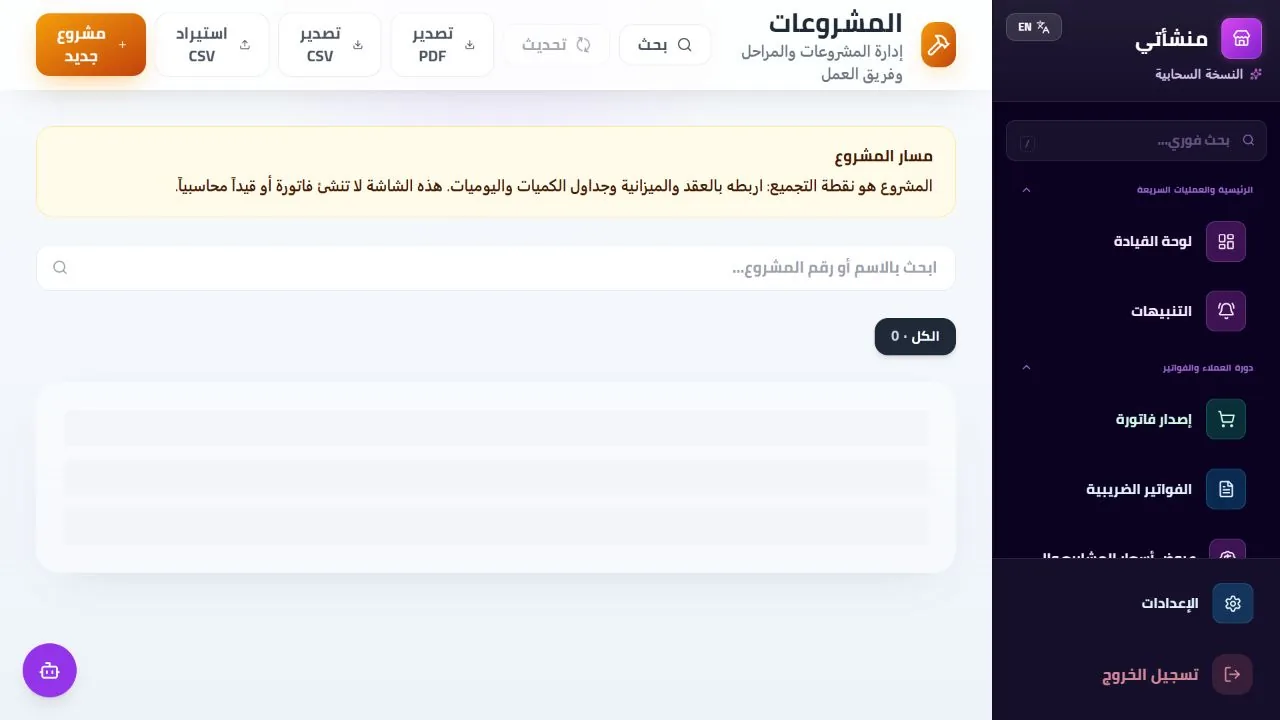
ENGINEX ERP Projects
Screenshots show the Arabic interface; every screen is also available in English.

Projects

A workspace connecting phase, budget, and progress.

  • Operating status
  • Phases and teams
  • Budget and progress
The issue is not missing data

The issue is that every team works from a different version of the truth.

When quantities, contracts, site records, and invoices disconnect, even a polished report arrives too late.

01

Scattered data

Spreadsheets, messages, and folders stop matching when a decision is due.

02

Late certificates

Payments slip when quantities and approvals live apart.

03

Unknown actual cost

Variance becomes visible only after it grows.

04

Manual compliance

Tax and invoice data are assembled from multiple sources each time.

ENGINEX makes each step a source of data for the next, turning scattered follow-up into decisions with clear financial impact.

One traceable operating flow

From proposal to journal entry, never re-enter what the system already knows.

Each stage inherits references, quantities, ownership, and state from the previous one while preserving the operating and financial link.

  1. 01

    Tender & pricing

    Scope and pricing.

    Passes approved items
  2. 02

    Contract & budget

    Value, plan, and cost centers.

    Passes cost baseline
  3. 03

    Execution & certificate

    Materials, equipment, progress, and certificates.

    Passes financial impact
  4. 04

    Journal & margin

    Cost, entries, and margin per project.

    Makes the decision visible
New: AI in procurement

Upload the supplier invoice. Let the system do the data entry.

ENGINEX reads and analyzes the purchase invoice file, fills in its data, and adds new suppliers automatically with one click, with a real preview of the uploaded invoice beside the data.

  1. 01
    Upload the invoiceThe purchase invoice file as your supplier sent it.
  2. 02
    AI reads and analyzesThe system reads the invoice and extracts its data.
  3. 03
    Filled in with one clickInvoice data is filled in and new suppliers are added automatically.
  4. 04
    Real previewThe uploaded invoice stays beside the data so you can check it by eye.
15+ connected modules

Everything required to run the business, organized around your work—not disconnected screens.

Start with the team under the most pressure today, then expand without rebuilding your processes.

⌘

2
↗
ProjectsOne view of phases, teams, and progress.
↗
Contracts & certificatesLink value and claims to execution.
₿

4
↗
Budgets & costSee actuals and variance early.
↗
Branch accountingAn isolated database per branch when needed, with a head-office dashboard for sales, cost, and net profit.
↗
Accounting & payrollEntries and payroll linked to sources.
↗
Reports & dashboardsSignals in the same context.
▦

3
↗
Materials & inventoryBalances, movements, and demand.
↗
Procurement & suppliersFrom request to delivery, with AI reading of purchase invoices.
↗
Equipment & maintenanceControl assets, operation, and service.
✓

3
↗
Tax invoicingStructured, traceable data.
↗
Roles & approvalsEvery role sees and approves its work.
↗
Audit trailUser, time, and reference for each change.
Tax-ready across the Arab world

Invoice with confidence and keep tax context connected to every transaction.

Tax invoicing is not a separate screen. Customer, line-item, tax, and operating references stay connected for review, with support for Egypt, Saudi Arabia, and every Arab country's tax regime, including ZATCA and ETA.

QR · Traceable tax invoiceCustomer, line, and tax data in one document.
VAT · Continuous tax contextLink each invoice to its operating source.
AR · All Arab countriesCountry-specific tax regimes: Egypt, Saudi Arabia, the UAE, and more.
Control is part of the product

Move fast without giving up governance.

Clear permissions, data isolation, and an audit trail tie every decision to who made it and when.

◌

Clear roles

Permissions by role, branch, and job.

▣

Tenant data isolation

Logical separation for each organization.

≡

Full audit trail

Review who changed what and when.

⌁

Secure data transport

Protected cloud communication.

One cloud service

Office decisions, site execution, and the same data everywhere.

Windows, web, and mobile connect to the same ENGINEX cloud service with role-based access.

WIN

Windows

Cloud desktop experience for daily work and printing.

MOB

Mobile

Responsive access for field teams.

WEB

Browser

Secure access from modern devices.

Product proof before purchase

Verify the product yourself before committing.

Real product interface
Displayed screenshots come from the working product.
Try before paying
Start a full trial without a payment card and verify your workflow.
Clear price. Free start.

Start free, then upgrade when you need accounting and branches.

No cardFree planFree

One user · No expiry

  • Invoices and quotations
  • Customers and expenses
  • Upgrade anytime
Annual onlyAnnual15,500 EGP / year

Enterprise · Up to 3 users · 30-day trial

10% offTwo years27,900 EGP / 2 years31,000 EGP

Enterprise · Up to 3 users · 30-day trial

Create your free workspace

Answers before you start

What you need to know before the next step.

Can supplier invoices be entered automatically?

Yes. Upload the purchase invoice file and AI reads it, fills in its data, and adds the new supplier with one click, with a real preview of the uploaded invoice.

Do I need a payment card for the trial?

No. The full 30-day trial begins without a payment card.

Does ENGINEX support Arabic and English?

Yes, with full Arabic RTL.

Does it work on Windows and mobile?

Yes. The apps connect to the same cloud service.

Is there a free plan?

Yes. A permanent free plan for one user covers invoicing, customers, and expenses with no card and no expiry.

Does the platform support branch accounting?

Yes. Each branch runs on a shared or isolated database, and the head-office dashboard consolidates sales, cost, expenses, and net profit per branch with a combined total.

Start with one project

Turn daily follow-up into operating and financial visibility you can trust.

Create your ENGINEX workspace, invite your team, and start a 30-day trial without a card.

Start your 30-day free trial